Hashing and Generating Password using Python
- May 7, 2022
- 5 min read

Having a weak password is not good for a system that demands high confidentiality and security of user credentials. It turns out that people find it difficult to make up a strong password that is strong enough to prevent unauthorized users from memorizing it.
Moreover, on the development side, user credentials is strongly recommend to protect their account on secure area though. Developers should always assume that their database will be compromised and take all necessary precautions to prevent anyone, who could get hold of your data, from exploiting it in any way possible. That is especially true for databases that store users' login credentials or other sensitive data.
So for this article, i'll show how to create a mixture strong random password which is unpredictable and cannot easily be memorized.
How to create a strong password ?
Depending on your comfort level, you can use any Code editors you want. To create a strong credentials, i introduce three methods that could help you cope with that.
Generate a random password by a mixture of numbers, alphabets, and other symbols found on the computer keyboard
Generate by Python package secrets
Generate by universally unique identifier (UUID)
Generate by a mixture of characters
Use the random method to select at least one character from combined array of characters. We can use the string module of Python or type all of them, in here i choose to write all of them out, if you want to shorting your code, you could you string module from Python by:
import string
import random

length = 16
characters = list(string.ascii_letters + string.digits + "!@#$%^&*()")
passwordCharacters = [random.choice(characters) for i in range(length)]
passwordCharacters = "".join(random_passwords)
Then, you could have a random string like this:
random_passwords = 'oU6ymKm1L^JAGNcn'or if you choosing to list all characters in one list, you could do like this
length = 16
combined_characters = ['0', '1', '2', '3', '4', '5', '6', '7', '8',                                                                                                                   '9',
                      'a', 'b', 'c', 'd', 'e', 'f', 'g', 'h',
                      'i', 'j', 'k', 'm', 'n', 'o', 'p', 'q',
                      'r', 's', 't', 'u', 'v', 'w', 'x', 'y', 'z',
                      'A', 'B', 'C', 'D', 'E', 'F', 'G', 'H',
                      'I', 'J', 'K', 'M', 'N', 'O', 'P', 'Q',
                      'R', 'S', 'T', 'U', 'V', 'W', 'X', 'Y', 'Z',
                      '@', '#', '$', '%', '=', ':', '?', '.', '/', '|', '~', '>', '*', '(', ')', '<'
                      ]
passwordCharacters = random.choices(combined_characters, k=length)
random.shuffle(passwordCharacters)
passwordString = "".join(passwordCharacters)
Generate by Python module named secrets
The secrets module is used for generating cryptographically strong random numbers suitable for managing data such as passwords, account authentication, security tokens, and related secrets.
To create, just feel free to write down:
import secrets
passwordString = secrets.token_hex()
you could have
passwordString = 'oU6ymKm1L^JAGNcn'or
import secrets
length = 16
passwordString = secrets.token_urlsafe(length)
it returns
passwordString = '3U23IK_YuJys4ZEXB_Hp1A'Generate by Python module named uuid
This module provides immutable UUID objects (the UUID class) and the functions uuid1(), uuid3(), uuid4(), uuid5() for generating version 1, 3, 4, and 5 UUIDs as specified in RFC 4122.
If all you want is a unique ID, you should probably call uuid1() or uuid4(). Note that uuid1() may compromise privacy since it creates a UUID containing the computer’s network address. uuid4() creates a random UUID. So i would use uuid4 in this case.
import uuid
uid = uuid.uuid4()
passwordString = str(uid).replace('-', '')
you should receive a result like this
passwordString = '08833472678f4a8587d1fa33a27aa3b4'Hurray! we have a complete strong password generator with three different approaches.
What Is Password Hashing?
Hashing is the process of using an algorithm to map data of any size to a fixed length. This is called a hash value. Whereas encryption is a two-way function, hashing is a one-way function.
In its most basic form, hashing refers to converting one string to another (which is also called a hash) using a hash function. Regardless of the size of an input string, the hash will have a fixed size which is predefined in a hashing algorithm itself. The goal is that the hash doesn't look anything like the input string and that any change in the input string produces a change in the hash.
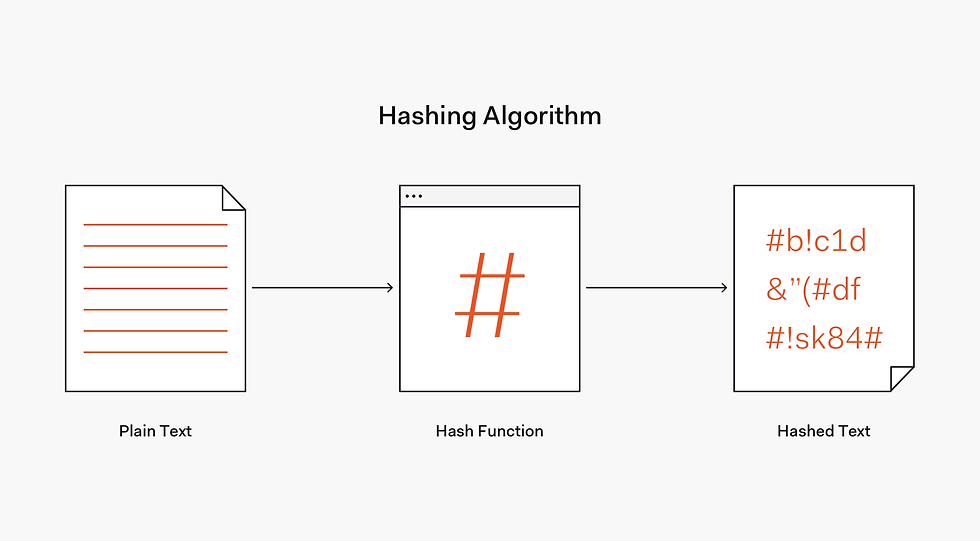
Source: https://images.ctfassets.net/23aumh6u8s0i/ES2U6Gx7w0yVF9Asidr26/75531c3695f09272142b543a94acc0de/hash-flow
What Is Salt in Password Hashing?
The problem with hashing is that the output (i.e. hash) is always the same for the same input. That makes hashing predictable, thus vulnerable.Therefore, it's advised to take additional precautions to make cracking stored passwords even more difficult so to solve that, passing an additional random string alongside the input string when performing hashing will ensure that the hashing no longer produces the same output every time it gets the same string as the input.
That fixed-length pseudorandom string passed alongside the input string when performing hashing is called salt. Salt is a fixed-length cryptographically-strong random value that is added to the input of hash functions to create unique hashes for every input.

Source: https://images.ctfassets.net/23aumh6u8s0i/5C8Vmfi1nfSSh9GDQw4IxZ/d2f5d28320b37760c2e86b141822e029/password-salt-example
How to Hash a Password in Python ?
The bcrypt and argon2 modules on PyPi could help you to do that
To install Bcrypt:
pip install bcryptbefore do the above step, you should to make sure that all dependencies are installed, so for Ubuntu and Debian:
sudo apt-get update
sudo apt-install build-essential libffi-dev python3-dev
For Fedora and RHEL-derivatives:
sudo yum install gcc libffi-devel python-develFor Alpine:
apk add --update musl-dev gcc libffi-devTo install Argon2:
pip install argon2-cffiHashing a Password by Bcrypt ?
import bcrypt

### Convert it to the array of bytes
password_string = 'oU6ymKm1L^JAGNcn'
password_string = password_string.encode('utf-8')

### Generate salt with gensalt function, the default length value is 12
salt = bcrypt.gensalt()

### Hashing in Bcrypt
hashed = bcrypt.hashpw(password_string, salt)

print(salt)
###### >>> b'$2b$12$wJYvfCAopb4HEV07vhTv1.'#####
print(hashed)
##### >>> b'$2b$12$wJYvfCAopb4HEV07vhTv1.auPq3kAqHEC9ZiApzLRWikKyPjk3x3y' #####
We import the bcrypt module.
import bcryptTo hash your password using Bcrypt, you must convert it to the array of bytes first. To achieve that, we can use the encode() method of the string
password_string = 'oU6ymKm1L^JAGNcn'
password_string = password_string.encode('utf-8')
A salt is generated with the gensalt function. One problem with an algorithm that does not have unique salts is that two users with the same password will hash to the same value. If one user sees this they know the other password. If an outside attacker sees this they have a hint that the users have chosen a common - and therefore weak - password.
salt = bcrypt.gensalt()A hashed value is created with hashpw function, which takes the cleartext value and a salt as parameters. Finally, you can hash the encoded password using BCrypt:
hashed = bcrypt.hashpw(password_string, salt)Hashing a Password by Argon2 ?
To get more details, read the paper Argon2: the memory-hard function for password hashing and other applications.
import argon2

### Set up hasher configuration
hasher = argon2.PasswordHasher(
    time_cost=argon2_time_cost,  # number of iterations
    memory_cost=argon2_memory_cost,  # kb unit
    parallelism=argon2_parallelism,  # how many parallel threads to use
    hash_len=argon2_hash_len,  # the size of the derived key in bytes
    salt_len=argon2_salt_len  # the size of the random generated salt in bytes
)

### Convert it to the array of bytes
password_string = 'oU6ymKm1L^JAGNcn'
password_string = password_string.encode('utf-8')

### Hashing in Argon2
encrypedPasswordstring = hasher.hash(password_string)
Memory: The memory used by the algorithm. To make hash cracking more expensive for an attacker, you want to make this value as high as possible.
Iterations: The number of iterations over the memory. The execution time correlates linearly with this parameter. It allows you to increase the computational cost required to calculate one hash.
Parallelism: The number of threads to use. This should be chosen as high as possible to reduce the threat imposed by parallelized hash cracking.
Salt Length: The authors of Argon2 recommend this parameter to be 128 bits, but say it can be reduced to 64 bits in the case of space constraints.
Key Length (i.e. Hash Length): This parameter depends on the intended usage. The Argon2 algorithm authors claim that a value of 128 bits should be sufficient for most applications.
To reach the desired execution time, you can tweak two variables. It is recommended to start with the highest amount of memory ( memory_cost ) possible and one iteration ( time_cost ). Reduce the memory until one hashing operation takes less than your desired duration. Next, advance the number of iterations to approach the desired< execution time as close as possible.
Conclusion
This article is purposely brief and aims to be an introduction and reference for developers that want to use the Argon2 and Bcrypt password hashing algorithm for implementing secure login. To put things into a perspective, we've explained basic terminology in a general sense and then illustrated the process of hashing a password
Happy coding !!!

Comments